One of the best ways to understand Agentic AI is to build a simple AI agent yourself.
Modern AI agents are not just chatbots. They can:
- reason about goals
- choose actions
- use tools
- retrieve information
- execute workflows
- observe outcomes
- continue iterating until a task is complete
In this tutorial, we will build a very simple Python AI agent that can:
- accept a goal
- reason about what to do
- use a tool
- observe the result
- generate a final response
The goal of this article is not to build a production system.
Instead, the purpose is to understand the core architecture behind modern Agentic AI systems.
What You Will Build
We will create a minimal AI research agent.
Example:
User Goal:"Research the benefits of vector databases."
The agent will:
- analyze the request
- call a mock search tool
- retrieve information
- summarize findings
This introduces the core concepts behind:
- reasoning
- tool calling
- execution loops
- observations
- autonomous workflows
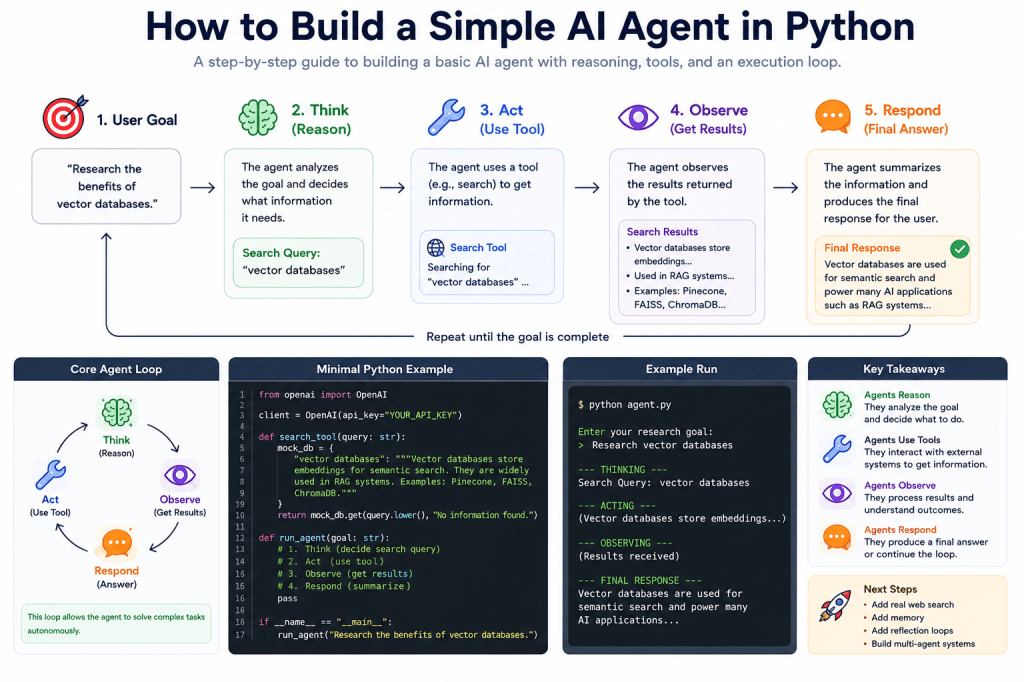
The Core Agent Loop
Most AI agents follow a loop similar to:
Think → Act → Observe → Respond
Our simple agent will implement a lightweight version of this pattern.
Prerequisites
You only need:
Install Dependencies
We will use the official OpenAI Python SDK.
Install it:
pip install openai
Project Structure
Create a simple project folder:
simple_ai_agent/│├── agent.py└── requirements.txt
Step 1 — Import Dependencies
Create:
agent.py
Add:
from openai import OpenAI
Step 2 — Configure the Client
Add your API key:
client = OpenAI( api_key="YOUR_API_KEY")
In production systems, use:
- environment variables
- secret managers
- .env files
Never hardcode secrets in real applications.
Step 3 — Create a Simple Tool
Modern AI agents use tools.
Our first tool will simulate web search.
Add:
def search_tool(query: str): mock_database = { "vector databases": """Vector databases store embeddings for semantic search.They are widely used in RAG systems and AI agents.Popular examples include Pinecone, FAISS, and ChromaDB.""" } return mock_database.get( query.lower(), "No information found." )
This is a mock search system —
but it demonstrates how tools work.
Step 4 — Create the Agent Function
Now we create the agent itself.
Add:
def run_agent(user_goal: str): print("\n--- THINKING ---") reasoning_prompt = f"""You are an AI research agent.User goal:{user_goal}Decide what search query should be used.Only return the search query.""" response = client.chat.completions.create( model="gpt-4.1-mini", messages=[ { "role": "user", "content": reasoning_prompt } ] ) search_query = response.choices[0].message.content.strip() print("Search Query:", search_query)
This is the:
THINK
phase of the agent loop.
The model reasons about:
- the user goal
- the best search query
Step 5 — Execute the Tool
Now the agent acts.
Add:
    print("\n--- ACTING ---")

    tool_result = search_tool(search_query)

    print(tool_result)
This is the:
ACT
phase.
The agent calls an external capability.
Step 6 — Observe the Result
Now the agent processes the returned information.
Add:
    print("\n--- OBSERVING ---")

    observation_prompt = f"""
User goal:
{user_goal}

Search results:
{tool_result}

Write a helpful summary for the user.
"""

    final_response = client.chat.completions.create(
        model="gpt-4.1-mini",
        messages=[
            {
                "role": "user",
                "content": observation_prompt
            }
        ]
    )

    answer = final_response.choices[0].message.content

    print("\n--- FINAL RESPONSE ---")
    print(answer)
This is the:
OBSERVE + RESPOND
phase.
The agent analyzes tool output and generates a final response.
Step 7 — Run the Agent
Add:
if __name__ == "__main__": user_goal = input("Enter your research goal: ") run_agent(user_goal)
Full Working Code
Here is the complete script:
from openai import OpenAIclient = OpenAI( api_key="YOUR_API_KEY")def search_tool(query: str): mock_database = { "vector databases": """Vector databases store embeddings for semantic search.They are widely used in RAG systems and AI agents.Popular examples include Pinecone, FAISS, and ChromaDB.""" } return mock_database.get( query.lower(), "No information found." )def run_agent(user_goal: str): print("\n--- THINKING ---") reasoning_prompt = f"""You are an AI research agent.User goal:{user_goal}Decide what search query should be used.Only return the search query.""" response = client.chat.completions.create( model="gpt-4.1-mini", messages=[ { "role": "user", "content": reasoning_prompt } ] ) search_query = response.choices[0].message.content.strip() print("Search Query:", search_query) print("\n--- ACTING ---") tool_result = search_tool(search_query) print(tool_result) print("\n--- OBSERVING ---") observation_prompt = f"""User goal:{user_goal}Search results:{tool_result}Write a helpful summary for the user.""" final_response = client.chat.completions.create( model="gpt-4.1-mini", messages=[ { "role": "user", "content": observation_prompt } ] ) answer = final_response.choices[0].message.content print("\n--- FINAL RESPONSE ---") print(answer)if __name__ == "__main__": user_goal = input("Enter your research goal: ") run_agent(user_goal)
👉 You can experiment with a practical Python implementation of this concept in the official GitHub repository for the Reasoning Systems examples: https://github.com/BenardoKemp/programming-agentic-ai/tree/main/how-to-build-a-simple-ai-agent-in-python
Running the Agent
Start the program:
python agent.py
Enter your research goal:Research vector databases
Output:
--- THINKING ---Search Query: vector databases--- ACTING ---Vector databases store embeddings...--- OBSERVING ------ FINAL RESPONSE ---Vector databases are used for semantic search...
Understanding the Architecture
Even though this is simple, it already contains the major components of Agentic AI.
1. Reasoning
The model reasons about:
- the goal
- what to search for
2. Tool Usage
The agent calls:
- external functionality
3. Observation
The agent processes returned information.
4. Execution Flow
The system moves through:
- thinking
- acting
- observing
- responding
This is the foundation of modern AI agents.
Why This Is Different from a Chatbot
A chatbot usually works like:
User Prompt → Response
Our agent instead performs:
Goal ↓Reason ↓Use Tool ↓Observe Result ↓Generate Final Response
This is fundamentally different.
The system is no longer just generating text —
it is executing a workflow.
Adding More Tools
Real agents often use many tools.
Examples:
- web search
- SQL databases
- Python execution
- browser automation
- APIs
- vector databases
- file systems
You can easily extend this architecture.
Example:
tools = { "search": search_tool, "calculator": calculator_tool, "database": sql_tool}
This leads toward more advanced agent systems.
Adding Memory
Modern agents often include memory.
Memory may store:
- previous actions
- prior observations
- user preferences
- long-term knowledge
Simple memory example:
memory = []memory.append(tool_result)
More advanced systems use:
- vector databases
- embeddings
- semantic retrieval
Adding Reflection
Advanced agents often critique themselves.
Example:
Generate ↓Critique ↓Revise ↓Retry
Reflection loops significantly improve reliability.
Adding Loops
Production agents often operate continuously.
Example:
while not task_complete: think() act() observe()
This creates autonomous execution behavior.
Common Problems in AI Agents
Even simple agents introduce challenges.
Hallucinations
The model may:
- invent tool outputs
- misuse tools
- generate invalid reasoning
Infinite Loops
Agents may repeatedly retry failing tasks.
Tool Failures
External systems may:
- timeout
- crash
- return invalid data
Cost Explosion
Long-running reasoning loops consume:
- tokens
- API calls
- compute
Production systems require safeguards.
Next Steps
After building this simple agent, good next projects include:
- adding real web search
- adding vector memory
- building a coding agent
- adding reflection loops
- integrating MCP servers
- building multi-agent systems
- adding async orchestration
- using graph-based execution
Final Thoughts
Building a simple AI agent in Python is one of the best ways to understand how modern Agentic AI systems actually work.
Even basic agents already demonstrate:
- reasoning
- tool usage
- execution loops
- workflow orchestration
- autonomous behavior
As agents become more advanced, the same architectural ideas scale into:
- coding assistants
- research systems
- autonomous workflows
- multi-agent systems
- production AI orchestration platforms
Understanding these foundations is essential for building the next generation of intelligent software systems.
 Programming Agentic AI